
This is a case study of a WooCommerce delivery date plugin I built for a florist in Australia. Customers pick their delivery date right on the cart page, but only from dates the shop can actually deliver to their postcode. Holidays, closed days, same-day cutoffs and delivery charges are all handled by settings the shop owner manages themselves.
The problem: flowers have to arrive on the right day
Flowers are almost always ordered for a specific day. A birthday, an anniversary, a funeral, Mother’s Day. If the date is wrong or the shop can’t deliver to that area on that day, the order turns into phone calls, refunds and an unhappy customer.
The shop delivers across several zones, from nearby streets out to the edge of its delivery area. Each zone has its own rules:
- Some zones only get deliveries on certain weekdays.
- Each zone has its own cutoff time for same-day delivery.
- The delivery charge depends on the zone and the day, and busy dates can cost more.
- Nobody should be able to pick a public holiday or a day the shop is closed.
- Some customers collect in store, and they need a pickup date and time instead.
Without checks like these, a customer can place an order for a date that doesn’t work for their postcode, and the shop only finds out afterwards. The shop needed a WooCommerce delivery date plugin that did the checking in the cart, up front.
Why not an off-the-shelf plugin?
There are good delivery date plugins for WooCommerce, and for many shops one of them is the right answer. I always look at those first. I’ve written about how I decide between a custom plugin and an existing one.
The usual reasons a custom build makes sense are a mix of rules that don’t fit a general plugin’s settings, the need to work with the store’s existing checkout and pricing setup, and wanting a simple admin screen with only the options the shop actually uses. That’s where this WooCommerce delivery date plugin landed. The rules here tie postcode zones, weekdays, cutoff times and charges together, and the plugin had to work with the cart and checkout the store already had.
What I built in the WooCommerce delivery date plugin
An admin screen the owner can manage
The plugin adds an Order Delivery Date page in wp-admin with four tabs:
- General settings: a list of postcodes for each delivery zone (just comma-separated) and a same-day cutoff time for each zone.
- Holidays: add a name and a date, and that day is blocked for everyone.
- Delivery charges: for each zone, choose the weekdays it delivers on and the charge for those days. You can also set a different charge for one specific date, such as a busy holiday.
- Specific dates: pick a date range and write a short message, for example a note about a busy week. Customers see it when they choose a date in that range.
A clear cart experience
On the cart page, what the customer sees depends on the shipping method they choose:
- Delivery: they enter their postcode and press Check. If the shop doesn’t deliver there, they’re told straight away. If it does, a date picker opens that only allows valid dates for that zone.
- Pickup: they get a pickup date picker, with holidays blocked, and a pickup time picker in 15-minute steps.
Before the cutoff time, the WooCommerce delivery date plugin shows a live countdown for how long is left to get same-day delivery. After the cutoff, it moves the default to the next available day and tells the customer, so they aren’t left guessing. The Proceed to Checkout button stays disabled until a postcode and date are filled in.
The rules behind the date picker
- Past dates can’t be picked.
- Holidays are greyed out, and hovering shows the holiday name.
- If a zone only delivers on some weekdays, the other days show as not available.
- The same-day cutoff is per zone and uses the site’s own timezone, not the visitor’s computer clock.
- When a date is picked, the right delivery charge appears in the cart totals straight away.
How the WooCommerce delivery date plugin works under the hood
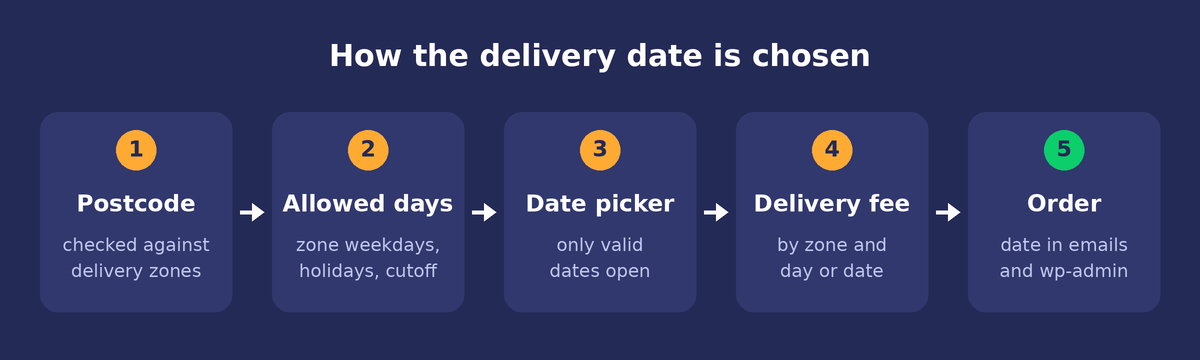
I kept the moving parts simple:
- Settings: postcode lists and cutoff times are stored as normal WordPress options. Holidays, delivery charges and special dates each have their own small database table, so the lists can grow without slowing anything down.
- Postcode check: when the customer presses Check, a quick background request matches the postcode against each zone and sends back that zone’s allowed weekdays and the holiday list. The date picker is built from that answer.
- Date picker: it uses the jQuery UI datepicker that already ships with WordPress, so there’s no heavy extra library. Each day is checked against the holiday list and the zone’s weekdays before it’s shown as available.
- Delivery charge: the plugin looks for a charge set for that exact date first, then falls back to the charge for that weekday in that zone. It’s added as a separate line in the cart totals using WooCommerce’s own fee system, and it’s skipped for pickup orders.
- Double check on the server: hiding a button isn’t enough on its own. If someone reaches checkout on a delivery order without a postcode and date, they’re sent back to the cart, and the order won’t go through without a date.
- Saved with the order: the delivery date, or the pickup date and time, is saved with the order. It shows on the thank-you page, in the WooCommerce order emails, and on the order screen in wp-admin, so the shop knows exactly when each order is due.
The WooCommerce delivery date plugin also works with the store’s existing checkout plugin, showing the chosen delivery or pickup details in the checkout summary.
What the WooCommerce delivery date plugin changed for the shop
I’m not going to put made-up numbers on this. What changed is easy to see, though:
- Customers can only choose dates the shop can actually deliver to their postcode, so wrong-date orders don’t get through in the first place.
- Holidays, closed days and same-day cutoffs are handled automatically instead of by phone calls after the order.
- The right delivery charge is added for the zone and the day, with no manual adjustments.
- Every order arrives with its delivery or pickup date in the email and in wp-admin.
- The shop owner can add postcodes, holidays and charges themselves, without needing a developer for each change.
That last point matters most to me. A WooCommerce delivery date plugin like this should keep working when the shop’s rules change, and the person running the shop should be the one changing them.
Need a WooCommerce delivery date plugin for your store?
If your WooCommerce store has delivery rules that a general plugin can’t handle, such as zones, cutoffs, holidays or charges that depend on the day, I can build something that fits how you actually work. You can see more about my services and my WooCommerce development work, or get in touch and tell me how your deliveries run.